Ever had the perfect job in mind, sent in your resume online, and wished it would pass a quick review? But often, your application might get lost in the applicant tracking system, and you’re left wondering why the employer didn’t notice you. Surprisingly, real people don’t see 75% of job applications. Before a person looks at your resume, it has to go through this tracking system. Here’s everything you need to know about these systems and some tips to create an ATS-friendly resume.
What’s an Applicant Tracking System (ATS)?
It’s like computer software used by bosses and people hiring for jobs. This tool helps them quickly manage, organize, and review job applications. At first, big companies with many job applications started using it every week. Almost all big companies, about 99%, use ATS to make hiring people easier. Even though it began for big companies, many different-sized companies now use it too.
Why do Companies Use ATS?
Companies use ATS because hiring these days is more complicated. There are many job applicants, and companies need more time or resources to review every resume. So, they use automated systems like ATS to save time and focus on their primary goals.
Another reason is the need to follow employment laws. There are rules against discrimination in hiring, and using unbiased machines in the early stages of hiring helps reduce potential bias.
In simple terms, ATS helps companies quickly find candidates who meet the job qualifications. This saves time and money and ensures companies follow the rules and treat everyone fairly, regardless of race, gender, or age.
How to Create an ATS-Friendly Resume?
To ensure your resume works well with an ATS, follow these tips for writing and using an ATS-optimized resume.
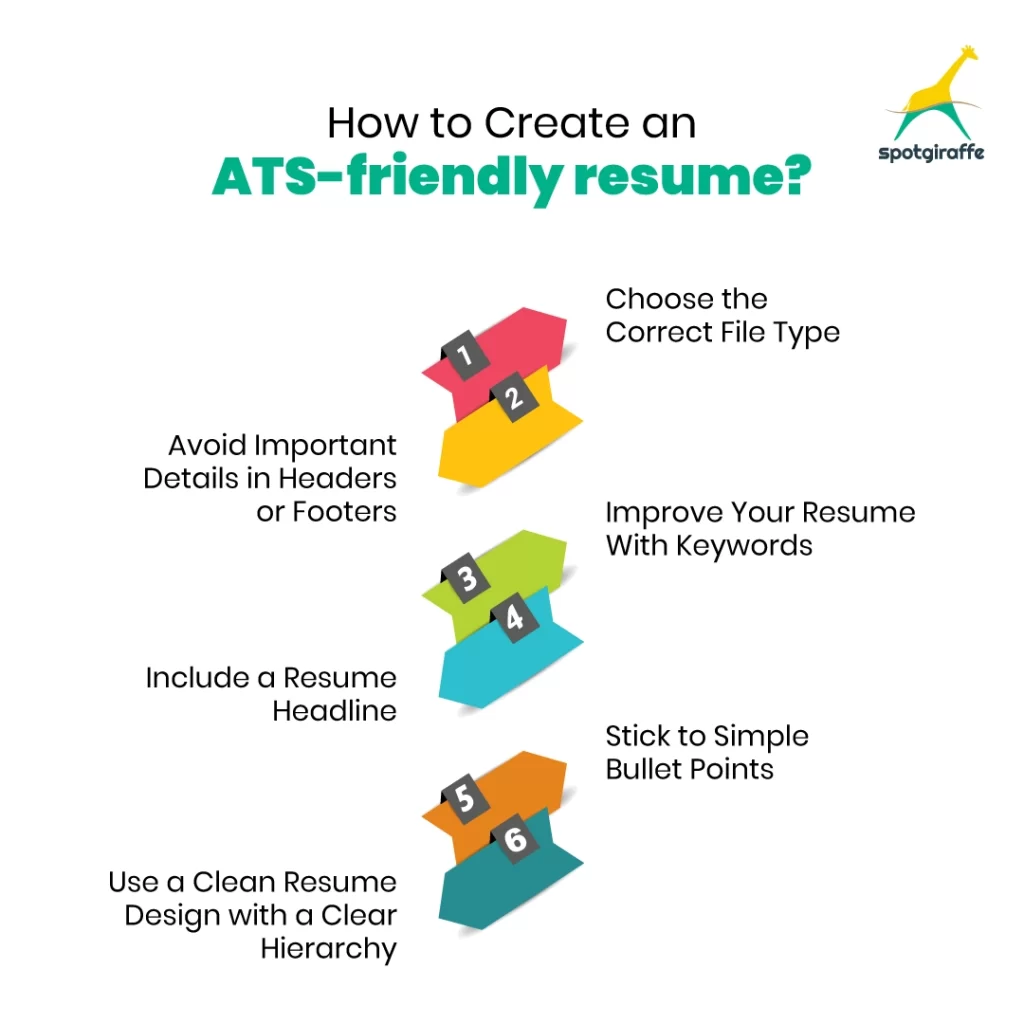
Choose the Correct File Type
Contrary to what many think, a PDF is not the most ATS-friendly file type. While PDFs maintain your resume’s design, not all ATS software supports them. If the system allows PDFs, use one. If not, stick to a Word document in .doc or .docx. Plain-text files work well with ATS, but limit your formatting options.
Avoid Important Details in Headers or Footers
Some ATS cannot correctly read information in the header and footer of a Word document. In a study, 25% of the time, the ATS missed crucial contact information. Place vital details like your name, phone number, and email address outside the header or footer to prevent this.
Improve Your Resume with Keywords
To ensure your resume aligns well with ATS requirements, it’s essential to incorporate the right keywords, a process known as keyword optimization. Unlike vague “buzzwords” such as “proactive” or “self-starter,” keywords specifically highlight your soft and hard skills, showcasing the expertise that qualifies you for your target job.
If you need clarification on the appropriate keywords, collect three to five job descriptions that match your desired position. Use a free word and phrase frequency tool like Online-Utility.org’s Text Analyzer to identify commonly used terms. If you possess these skills, integrate them into your resume.
Pay close attention to the job posting, focusing on listed skill requirements, desired experience, and educational qualifications. These are likely critical terms in an ATS resume scan, so include them in your resume.
Consider both the frequency and placement of these keywords throughout your resume. Some ATS systems assess skills based on keyword frequency (aim for two to three mentions), while others evaluate experience based on its placement. To optimize your resume for any ATS, address both aspects.
Put a “Core Competencies” or “Areas of Expertise” section below your professional summary, listing your most vital skills. Include standard abbreviations like “SEO.” Sprinkle these terms into your “Work Experience” or “Education” sections where applicable to demonstrate the practical application of these skills.
Include a Resume Headline
Ensure your resume has a headline and a short line right after your contact details and before your summary statement. Companies using ATS to screen resumes usually consider the job title a key factor. To craft an ATS-friendly headline:
- Find the job title from the job posting or description. If you’re applying for a Marketing Director role, include those words in your headline.
- Identify other essential requirements, such as five years of experience managing marketing teams. Consider including these qualifications in your headline.
- Create a headline that mixes the job title with descriptive language, immediately showing you’re a qualified candidate. Using our example, your headline might look like:
“Experienced Marketing Director with over five years of client success.”
Stick to Simple Bullet Points
When used appropriately, bullet points are adequate for showcasing achievements and qualifications on a resume. However, choosing elaborate symbols for your bullets can confuse your key points. Avoid intricate characters and stick to simple options like a solid, open, or square circle to ensure compatibility with an ATS. This ensures that your bullet points enhance your resume instead of making it incompatible with an ATS.
Use a Clean Resume Design with a Clear Hierarchy
Simplicity is critical when creating an ATS-friendly resume. Complex designs or unusual formats need to be clarified for most applicant tracking systems and frustrate recruiters accustomed to quickly scanning resumes for specific information in expected areas. Opt for a clean and straightforward design to make your resume effective for ATS and human reviewers.
To know more about preparing a resume, look for SpotGiraffe. SpotGiraffe is a tailored platform designed for professionals in the finance and accounting sectors, offering a comprehensive solution for job seekers and those looking to make strategic hires. Whether you’re exploring new career opportunities or aiming to make critical hires, SpotGiraffe stands out with its well-crafted platform.
Unlike traditional job search platforms, SpotGiraffe doesn’t just provide job listings but actively enriches your professional journey. The user-friendly interface makes it easy to discover job openings and access relevant information. This unique approach significantly increases your chances of finding exceptional opportunities in the dynamic fields of finance and accounting.